
Grow your safety business, not your admin.
One portal for every client who works with you. Know who needs you today, build each site's compliance plan from your own library, deliver your training everywhere, and walk into every renewal with the record. Free for safety professionals.

Your clients, at a glance
Know which client needs you today, and why
Before they have to ask. Every client is sorted by what needs doing, with the reason in plain words and whose move it is.
- Every client in one loginA client adds your firm with your partner code and turns on Training, Compliance or both, site by site. You see exactly those sites, and switch between clients without signing out.
- Your accounts, sorted by needEach client shows as at risk, watch, on track or no plan, with the reason, whose move it is and the next step. Your own late work comes first. Separate views for compliance and training.
- Call todayA short list of the clients worth a call today, and why: overdue work, something returned, something waiting on them, certificates lapsing, training gaps.
- A page for every client and siteA verdict, planned against done for the year, what is in your court and what is in theirs, and a month or year calendar of compliance tasks beside the client's training events.
- A contact log your whole team sharesLog a call against a requirement or task, set a follow-up date and keep a contacts list per site, so whoever picks it up next knows where things stand.
- Sign in with your mobileA sign-in code arrives in the Emredi app. Staff who work for more than one firm switch between them without signing out.
A compliance plan for every site
Build your standard plan once. Roll it out to every site.
Then start next year from this year's record.
- Your own library of requirementsWrite each requirement once: what it is, its tasks, the proof it needs and the documents that go with it. Improve it and choose which client sites receive the new version.
- Plan templatesYour standard plan, for example "Commercial office, Class 5", ready to start any client's plan. Repeat a requirement where it recurs, such as two evacuation drills a year, and add tasks on top.
- A plan builder for each site and yearStart from a template, last year's plan, another site's plan or a blank page. Drag requirements in, set owners and due dates in the dates planner, check it and send it to the site.
- The client stays in controlThe client's Compliance Admin publishes the plan. A client can also build its own plan and share it with you. Once a plan is live, what you add goes live straight away and the client is told.
- Copy from the previous yearNext year's plan starts from this year's, so the renewal conversation starts from the record.
- Reuse what worksSave a client's plan as a template for others. It never carries that client's people, dates, notes, fees or documents.
- One compliance board across all your clientsFilter by client, site or plan to see every task in one place.
Doing the work at the client's site
Your work, on the client's record
Everything your team does lands on the client's compliance board, where they can see it.
- Work on the client's compliance boardYour staff own tasks, add proof, upload documents and submit them to the client.
- Your sign-off, where the client wants itA client can make a requirement need your firm's approval as well as theirs. You approve it, or return it with a reason.
- Waiting for youYour home page lists what clients have sent you to look at.
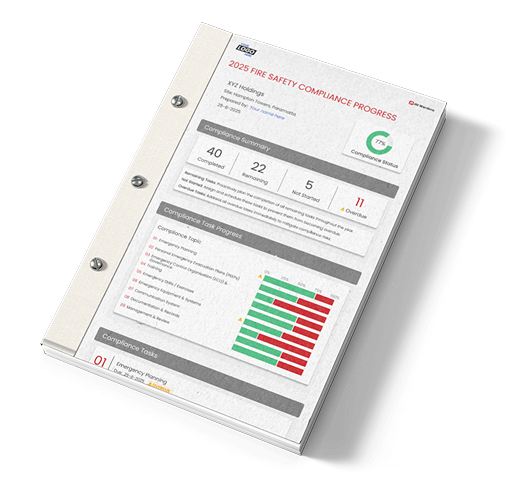
- A site compliance report to hand overA PDF report for each site that shows what is done, what is due and how far the year has come.
Documents
Your templates, current at every client
Your firm's documents stay yours. Each client works from its own copy, and you bring every copy up to date in one step.
- Document templates with versionsRelease a new version and update every client's copy in one step. Clients only ever see their own copy.
- Upload to a client's site libraryPut documents where the client's team will find them.
- Documents placed for youWhen a site publishes its plan, the documents your requirements call for are placed in its library.
- Private to one clientMark a template or library item as private to one client. It is never offered to another, and anything made from it stays private.
- Your own filingFile client documents under your firm's own categories. Clients never see them.
Training
Load your courses once. Every client who links you has them.
Propose a training event, let the client approve it, and the certificates record themselves on the day.
- One course catalogue for every clientLoad your courses once. Each client who gives you Training access has them in its training library, your edits flow through to every copy, and the client's admin chooses which courses each warden role requires.
- Run training events for your clientsCreate a training event at a client site, for your own courses or the client's own, straight from the gaps in its certification matrix. The client's admin approves it before wardens are invited. Manage the roster and capacity, with a waitlist when it fills.
- Attendance, competency and the certificateOn the day, take attendance from a tick list or let wardens sign in with a QR code, then mark each warden competent. Their certificate records itself with your course's validity, and the client is told and can return it.
- Certificate valid forSet how long each course's certificate lasts, or no end date. Every client's copy follows. When a certificate is recorded, its expiry date fills in from your course, so lapses show up early. Where a client's role asks for a course more often, the shorter period wins.
- Your training calendar, per client and siteYour events and the client's own in one calendar, with who organised each and the trainer, and a training table for every site.
- Training dashboards and coveragePositions certified, certificates lapsing, who needs training and upcoming events, with the client's warden coverage alongside, read-only.
- Training needs and coverage reportsA Warden Training Needs report, with CSV, and a Warden Coverage report for every client.
- Course fees, for your planningPer student or per delivery, with a class size, so booked training feeds your estimated revenue. Never shown to clients.
On the roadmap
Where training goes next
In development for safety professionals. We will tell partners as each one arrives.
- Reminders before certificates lapseOnce a client switches them on, wardens will get an email 60, 30 and 7 days before a certificate lapses, and the client's admins a weekly summary. Your team's daily email will show, client by client, how many certificates for your courses lapse soon.
- Training certificates and RTO recordsA record-of-training certificate with your logo, unit codes, RTO number, trainer and assessor, emailed to the warden and verifiable online by number, plus an export for your RTO system so your RTO can issue the Statement of Attainment.
- Transcripts and an audit exportA training transcript for every warden, and an export for audits.
- Online coursesYour online courses, hosted in Emredi.
Your team and your business
Logins for your whole team
Give each person Compliance Manager, Training Admin or both, for the clients or sites they look after. Administrators see everything, and a Library Admin keeps your library and templates in order.
Our firm, in one place
Your team, your firm's details and your courses on one page.
Estimated fees and revenue
Put an estimated fee on each task and see estimated revenue by calendar or financial year. A planning view, not invoicing. Fees are never shown to clients.
Free for safety professionals
The portal costs you nothing. Your clients subscribe to the Emredi Suite, and to Compliance if they want the register and reports.
What your clients see, and what they control
Stays with your firm
- Your fees, revenue and course fees
- Your own document categories
- Your plan descriptions
- Your templates and library. Clients get their own copies.
The client decides
- Which sites you see, and whether for Training, Compliance or both
- Whether to share a plan, and with which firm
- Publishing a plan, through their Compliance Admin
Held in Australia
- Client data is kept per client in AWS Sydney
- Training partners may see the names of the wardens they train
Bring a client and start them on a free trial
Emredi is partner-led by design: buildings run best when their fire safety provider is in the platform with them. So the offer is built around you.
Bring a client onto Emredi as their Safety Partner and they start on a two-month free trial. Your training library and your plan templates are ready for them on day one, and you stay their first call.
Request an account for your clientBe the partner we introduce
Buildings join Emredi without a fire safety provider too. When they do, we connect them with a partner who knows the platform, so the experience you build with your own clients becomes the way new ones find you.
Talk to us about joining →Your training library, built in
Load your courses once and every client who links you has them, ready to require of their warden roles. Certificates carry your course's validity, so lapses show up early.
See how training works →Free for safety professionals
The portal costs you nothing. You run every client's program from your own login, whatever their size.
Request your free account →Common questions
Can I manage all my clients from one login?
Yes. Every client who links your firm appears in one portal, sorted by what needs doing, and you switch between clients without signing out. Each client chooses which sites you see and whether for Training, Compliance or both.
How do compliance plans work?
You build your standard plan once as a template, then start each site's plan from it, from last year's plan or from another site's. You set owners and due dates and send it to the site; the client's Compliance Admin publishes it. Next year starts from this year's record.
Do my clients see my fees or my templates?
No. Your fees, revenue, course fees, document categories, plan descriptions and templates stay with your firm. Clients work from their own copies.
Can I control what each of my staff can see?
Yes. Each person gets Compliance Manager, Training Admin or both, for the clients or sites they look after. Administrators see everything.
Do my clients' wardens and occupants use the app too?
Yes. Wardens and occupants at every client building use the Emredi mobile app for alerts, messaging and evacuation. Your client's admin adds their people in the portal.
What do my clients get if I bring them onto Emredi?
A two-month free trial of the Emredi Suite when you come on board together as their Safety Partner. Your training library and plan templates are ready for them on day one, and you stay their first call for support.
What does it cost me?
Nothing. The portal is free for safety professionals. Your clients subscribe to the Emredi Suite and, if they want a compliance register and reports, to Compliance on top.
Is each client's data kept separate and secure?
Yes. Client data is kept per client in encrypted cloud infrastructure in Australia (AWS, Sydney), and each client decides which of its sites your firm can see.
Talk to us about your free account
Tell us a little about your business and what you would like to do first. We reply within one business day.
Thanks, we have your details.
We'll reply within one business day.

Join us
Your expertise, running in every building you look after
You bring the safety knowledge and the relationships. Emredi gives you one portal to run every client's program, free for you, and a two-month free trial for the clients you bring.
Talk to usPrefer email? info@emredi.app